Annotations
Notes, numbers and keys that explain a diagram: second lines in boxes, numbered steps, brackets, a legend and a caption. Plus two layout helpers that make diagrams read better: equal-sized panels and boxes lined up across panels.
Everything on this page in one diagram:
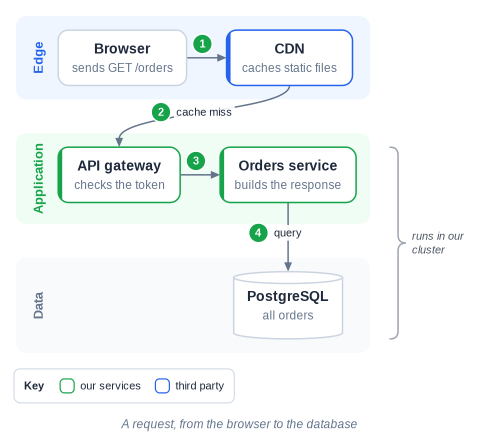
# SPDX-FileCopyrightText: 2026 Reza Jelveh
#
# SPDX-License-Identifier: Apache-2.0

# Annotations tour: every feature added since 0.2, in one small request-flow diagram.
#
#   sub="..."                second line under a label (nodes and groups)
#   steps=auto / step=N      numbered circles on edges
#   legend / caption         a key and a figure caption under the diagram
#   accent-bar, title-fill   CSS: a coloured side strip, a band behind a panel title
#   label-position: left     CSS: a panel title turned sideways
#   align=stretch            equal-height panels (in a row) or equal-width tiers (in a column)
#   align-x=ID               line a box up with one in another panel
#   bracket a, b "note"      a curly bracket with a note beside a range of boxes
#
# Render:  pdg examples/annotations.pdg -o annotations.svg
graph layout=column align=stretch gap=12 theme=hami steps=auto caption="A request, from the browser to the database"

# Panels in a column with align=stretch are all as wide as the widest one.
group edge "Edge" layout=row gap=40 .tier {
  browser "Browser" sub="sends GET /orders"
  cdn "CDN" sub="caches static files" .blue
}

group app "Application" layout=row gap=40 .tier {
  api "API gateway" sub="checks the token" .green
  orders "Orders service" sub="builds the response" .green
}

group data "Data" layout=row .tier {
  # align-x puts the database right under the Orders service, so the arrow is straight.
  # (It moves a box only within its own panel's free space.)
  db "PostgreSQL" sub="all orders" shape=cylinder align-x=orders
}

# steps=auto numbers these in file order: 1, 2, 3 ...
browser -> cdn
cdn -> api "cache miss"
api -> orders
orders -> db "query"

# A bracket spans from the top of the first box to the bottom of the last one.
bracket api, db "runs in our\ncluster"

legend "Key"
legend .green "our services"
legend .blue "third party"

css {
  group.tier { label-position: left; title-fill: none; }
  #edge { fill: #eff6ff; color: var(--blue); stroke: none; }
  #app  { fill: #f0fdf4; color: var(--green); stroke: none; }
  #data { fill: #f8fafc; color: var(--muted); stroke: none; }
}
Second lines
sub="..." puts a smaller, grey line under a box's label. It works on panels too.
api "API gateway" sub="checks the token"
group app "Application" sub="runs in Kubernetes" { ... }
Style it with the sub selector: node.core sub { color: #dcfce7; }. Use \n for more
than one line.
Numbered steps
graph steps=auto numbers every arrow in the order the file lists them. Set one by hand
with step=N; hand-set numbers are skipped by the automatic count.
graph steps=auto
browser -> cdn
cdn -> api "cache miss"
A step sits just left of the arrow's label. Without a label it sits on the arrow a third of
the way along, or beside the arrow when the arrow is too short to hold it, so it never
covers a box. Gaps in a column grow to fit it. Style it with step: step { fill: var(--green); }.
Brackets
bracket a, d "note" draws a curly bracket on the right, from the top of the highest box
listed to the bottom of the lowest, with the note beside it. Overlapping brackets stack
outwards, shortest nearest the diagram. Style with bracket.
bracket api, db "runs in our\ncluster"
Legend and caption
legend "Key"                     # names the key box
legend .green "our services"     # one entry, drawn like a box with class .green
graph caption="Figure 1: ..."    # a line of text under everything
Style them with legend and caption.
Side titles, side strips, title bands
These are CSS properties:
label-position: leftturns a panel's title sideways down its left edge.accent-bar: 4px #16a34adraws a coloured strip on a box's left side;accent-side: rightmoves it. It follows the box's rounded corners.title-fill: #dbeafefills a band behind a panel's title.
Equal sizes
align=stretch on a row or column makes every child as big as the largest: equal-width
layers in a column, equal-height panels in a row.
graph layout=column align=stretch
Lining up boxes across panels
Each panel centres its own boxes, so a box rarely ends up straight above the one it
connects to in the next panel. align-x=ID moves a box (or a whole group) sideways until
it is centred on another box:
group data "Data" layout=row {
  db "PostgreSQL" shape=cylinder align-x=orders
}
The box only moves within its own panel. Boxes on the side it moves towards move with it, so the gaps between them, and any labels in those gaps, stay as they were.