Mermaid diagram types
Each example from the Mermaid documentation, rewritten as a
plain .pdg file. There are no special diagram types: every one uses the same nodes,
edges and groups.
Flowchart
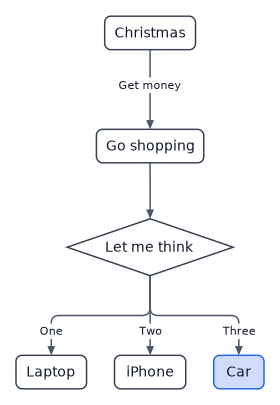
# SPDX-FileCopyrightText: 2026 Reza Jelveh
#
# SPDX-License-Identifier: CC-BY-4.0

# Mermaid "flowchart" docs example (Christmas)
graph theme=default dir=TB route=ortho radius=8

A "Christmas"
B "Go shopping"
C "Let me think" shape=diamond
D "Laptop"
E "iPhone"
F "Car" .accent

A -> B "Get money"
B -> C
C -> D "One"
C -> E "Two"
C -> F "Three"
State
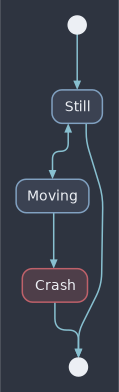
# SPDX-FileCopyrightText: 2026 Reza Jelveh
#
# SPDX-License-Identifier: CC-BY-4.0

# Mermaid "stateDiagram-v2" docs example (Still / Moving / Crash)
graph theme=nord dir=TB route=bend

start "" shape=circle width=18 height=18 .solid
Still "Still" shape=round
Moving "Moving" shape=round
Crash "Crash" shape=round .red
stop "" shape=circle width=18 height=18 .solid

start -> Still
Still -> stop
Still <-> Moving
Moving -> Crash
Crash -> stop
Entity relationship
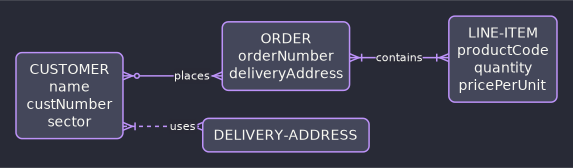
# SPDX-FileCopyrightText: 2026 Reza Jelveh
#
# SPDX-License-Identifier: CC-BY-4.0

# Mermaid "erDiagram" docs example (customer / order / line-item)
graph theme=dracula dir=LR route=ortho arrow=both head=many head-start=one

CUSTOMER "CUSTOMER\nname\ncustNumber\nsector"
ORDER "ORDER\norderNumber\ndeliveryAddress"
LINE_ITEM "LINE-ITEM\nproductCode\nquantity\npricePerUnit"
DELIVERY_ADDRESS "DELIVERY-ADDRESS"

CUSTOMER -- ORDER "places" head=zero-many
ORDER -- LINE_ITEM "contains" head=one-many
CUSTOMER .. DELIVERY_ADDRESS "uses" head=one-many
Class
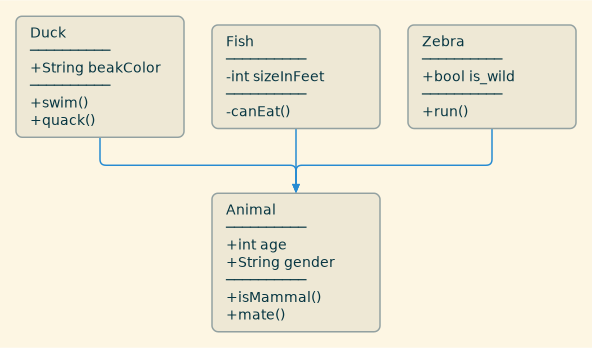
# SPDX-FileCopyrightText: 2026 Reza Jelveh
#
# SPDX-License-Identifier: CC-BY-4.0

# Mermaid "classDiagram" docs example (Animal hierarchy)
graph theme=solarized-light dir=TB route=ortho head=open
css { node { text-align: left; } }

Animal "Animal\n──────────\n+int age\n+String gender\n──────────\n+isMammal()\n+mate()"
Duck "Duck\n──────────\n+String beakColor\n──────────\n+swim()\n+quack()"
Fish "Fish\n──────────\n-int sizeInFeet\n──────────\n-canEat()"
Zebra "Zebra\n──────────\n+bool is_wild\n──────────\n+run()"

Duck, Fish, Zebra -> Animal head=triangle .accent
Block
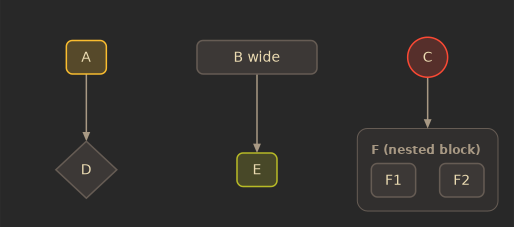
# SPDX-FileCopyrightText: 2026 Reza Jelveh
#
# SPDX-License-Identifier: CC-BY-4.0

# Mermaid "block-beta" docs example: blocks in a grid, edges between them
graph theme=gruvbox-dark layout=grid cols=3 gap=30 route=straight

a "A" .yellow
b "B wide" col=1 row=0 width=120
c "C" shape=circle .red
d "D" shape=diamond
e "E" .green
group f "F (nested block)" layout=row {
  f1 "F1"; f2 "F2"
}
a -> d
b -> e
c -> f
Architecture
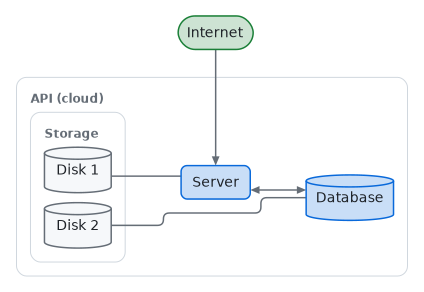
# SPDX-FileCopyrightText: 2026 Reza Jelveh
#
# SPDX-License-Identifier: CC-BY-4.0

# Mermaid "architecture-beta" docs example (API in the cloud)
graph theme=github-light dir=TB route=ortho radius=6 rank-gap=28

group api "API (cloud)" layout=layered dir=LR {
  db "Database" shape=cylinder .blue
  server "Server" .accent
  group storage "Storage" layout=column gap=10 {
    disk1 "Disk 1" shape=cylinder
    disk2 "Disk 2" shape=cylinder
  }
}
gateway "Internet" shape=pill .green

gateway -> server
server <-> db
disk1 -- server
disk2 -- db
Git graph
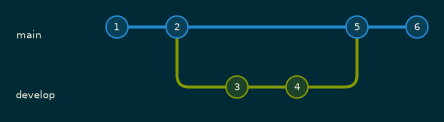
# SPDX-FileCopyrightText: 2026 Reza Jelveh
#
# SPDX-License-Identifier: CC-BY-4.0

# Mermaid "gitGraph" docs example: commits on lanes (fixed rows)
graph theme=solarized-dark layout=fixed route=bend arrow=none edge-width=3
css { node { min-width: 22px; min-height: 22px; padding: 2px; font-size: 10px; } }

main "main" at=0,8 shape=none
develop "develop" at=0,68 shape=none
c1 "1" shape=circle at=90,0 .blue
c2 "2" shape=circle at=150,0 .blue
c3 "3" shape=circle at=210,60 .green
c4 "4" shape=circle at=270,60 .green
c5 "5" shape=circle at=330,0 .blue
c6 "6" shape=circle at=390,0 .blue

c1 -- c2 -- c5 -- c6 .blue
c2 -- c3 .green exit=bottom enter=left
c3 -- c4 .green
c4 -- c5 .green exit=right enter=bottom
Mind map
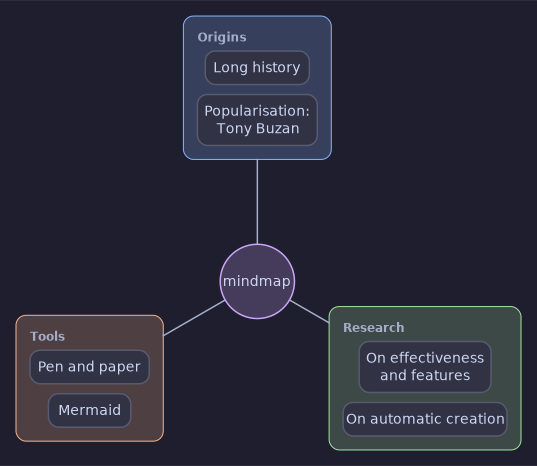
# SPDX-FileCopyrightText: 2026 Reza Jelveh
#
# SPDX-License-Identifier: CC-BY-4.0

# Mermaid "mindmap" docs example, as nested radial groups
graph theme=catppuccin-mocha layout=radial center=root route=straight arrow=none

root "mindmap" shape=circle .purple
group origins "Origins" layout=column gap=10 .blue {
  o1 "Long history"
  o2 "Popularisation:\nTony Buzan"
}
group research "Research" layout=column gap=10 .green {
  r1 "On effectiveness\nand features"
  r2 "On automatic creation"
}
group tools "Tools" layout=column gap=10 .orange {
  t1 "Pen and paper"
  t2 "Mermaid"
}
root -- origins
root -- research
root -- tools