Getting started
Install
pip install "predictygraph[apng]" # [apng] adds animated PNG output
or run it without installing:
uvx --from predictygraph pdg diagram.pdg
Until the first PyPI release, install from GitHub:
uv tool install "predictygraph[apng] @ git+https://github.com/predictygraph/predictygraph"
Your first diagram
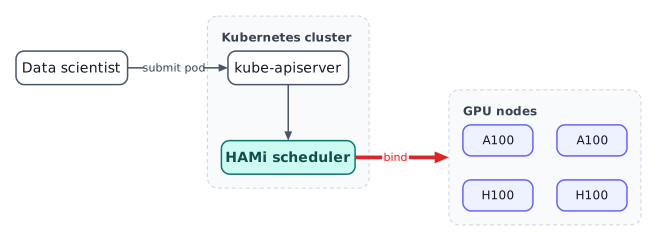
Save this as hello.pdg:
graph dir=LR route=ortho
css "theme.css"

user "Data scientist"
group k8s "Kubernetes cluster" layout=layered dir=TB {
  api "kube-apiserver"
  sched "HAMi scheduler" .hami
  api -> sched
}
group gpus "GPU nodes" layout=grid cols=2 {
  default node .gpu
  g0 "A100"; g1 "A100"; g2 "H100"; g3 "H100"
}
user -> api "submit pod"
sched ==> gpus "bind" .hot
Render it:
pdg hello.pdg                 # -> hello.svg (animated if the diagram uses flows)
pdg hello.pdg --static        # SVG frozen at t=0
pdg hello.pdg -o hello.png    # animated PNG
pdg hello.pdg --check         # validate only
The five things to know
- One statement per line.
;separates statements on one line.#plus a space starts a comment. - Nodes:
id "Label" .class key=value. The label is optional. - Edges:
a -> b "label". Chains (a -> b -> c) and fan-out (a -> b, c) work. - Groups have their own
layout=:group id "Title" layout=grid cols=2 { … }. - Styling is CSS:
css "theme.css"orcss { node.db { fill: #e0f2fe; } }.
Safety
Diagrams are often shared, so image= and css "…" may only read files inside the
folder of the .pdg file. Use --allow-outside to lift that for trusted input.
Next: Layouts, Edges and routing, Styling.