Animation
Animation makes a diagram show what moves where: requests travelling to a server, data flowing into a database, the one component that's busy.
It never changes the layout. The first frame is always the complete diagram, so PDFs, printouts and image viewers that don't animate still show everything.
Use SVG
Animated diagrams are written as SVG. They play in every modern browser, stay sharp at any zoom, and are tiny: every animation on this page is under 20 KB.
Moving edges
Add flow= to an edge to send dots along it.
# SPDX-FileCopyrightText: 2026 Reza Jelveh
#
# SPDX-License-Identifier: CC-BY-4.0

graph dir=LR rank-gap=120 node-gap=16

a1 "source"; b1 "target"
a2 "source"; b2 "target"
a3 "source"; b3 "target"
a4 "source"; b4 "target"

a1 -> b1 "forward" flow=forward
a2 -> b2 "reverse" flow=reverse
a3 <-> b3 "both" flow=both
a4 <- b4 "auto" flow=auto
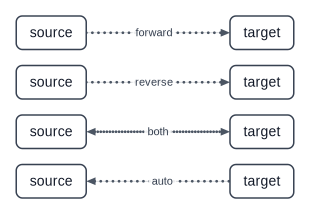
flow=forward: dots travel from source to target.flow=reverse: dots travel from target to source.flow=both: two streams, one each way.flow=auto: follow the arrowheads (->forward,<-reverse,<->both).
Speed
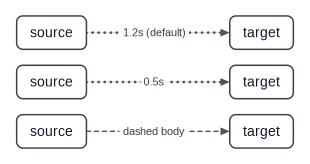
flow-speed= sets how long one cycle takes. Smaller is faster. The default is 1.2s;
ms works too. A dashed edge (..>) animates its own dashes instead of dots.
# SPDX-FileCopyrightText: 2026 Reza Jelveh
#
# SPDX-License-Identifier: CC-BY-4.0

graph dir=LR rank-gap=120 node-gap=16

a1 "source"; b1 "target"
a2 "source"; b2 "target"
a3 "source"; b3 "target"

a1 -> b1 "1.2s (default)" flow=forward
a2 -> b2 "0.5s" flow=forward flow-speed=0.5s
a3 ..> b3 "dashed body" flow=forward
Animated borders
border= animates the outline of a node or group. border-speed= sets the cycle time
(default 1.6s).
# SPDX-FileCopyrightText: 2026 Reza Jelveh
#
# SPDX-License-Identifier: CC-BY-4.0

graph layout=row gap=48

march "march" border=march
pulse "pulse" border=pulse
glow "glow" border=glow
group g "group, march" border=march layout=row {
  x "inside"
}
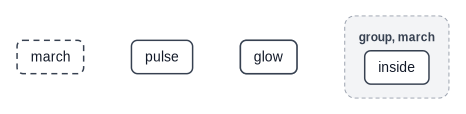
border=march: a dashed outline that crawls around the box.border=pulse: the outline grows and fades.border=glow: a halo spreads out and fades behind the box.
Animate with CSS
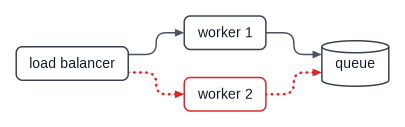
Every animation setting is also a CSS property, so you can mark things with a class and animate them all at once.
# SPDX-FileCopyrightText: 2026 Reza Jelveh
#
# SPDX-License-Identifier: CC-BY-4.0

graph dir=LR route=bend
css {
  edge.hot  { stroke: #dc2626; flow: forward; flow-speed: .6s; }
  node.busy { stroke: #dc2626; border: pulse; border-speed: 1s; }
}

lb "load balancer"
w1 "worker 1"
w2 "worker 2" .busy
q "queue" shape=cylinder

lb -> w1
lb -> w2 .hot
w1 -> q
w2 -> q .hot
Everything together
# SPDX-FileCopyrightText: 2026 Reza Jelveh
#
# SPDX-License-Identifier: CC-BY-4.0

# Animation showcase: flowing edges in each direction, animated borders
graph theme=nord dir=LR route=bend

client "client" border=pulse
api "API gateway" border=march
svc "service"
db "database" shape=cylinder border=glow .green
cache "cache" .yellow

client -> api flow=forward
api -> svc flow=forward flow-speed=0.8s
svc <-> db flow=both
svc <- cache flow=auto           # follows the arrow: cache -> svc
api .. cache flow=reverse arrow=none

Settings at a glance
- Edges:
flow=forward|reverse|both|auto,flow-speed=1.2s - Nodes and groups:
border=march|pulse|glow,border-speed=1.6s - Where they work: on a single item, in
default node|edge|group, as CSS properties, and (flow-speedonly) on thegraphline.
Static output
pdg x.pdg --static      # no animation, first frame
pdg x.pdg --at 0.4      # frozen at 0.4 s
pdg x.pdg -o x.png      # animated PNG, for places that can't show SVG (much larger)