Layouts
Every container (the whole graph, or a group) chooses its own layout. Groups are laid
out inside-out, then treated as one box by their parent. That is what makes the output
predictable: changing a group never reshuffles its siblings.
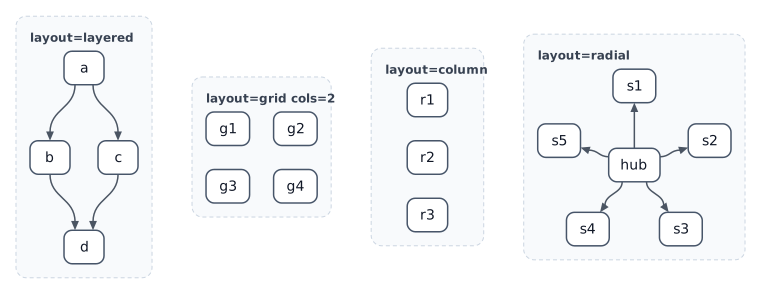
graph dir=LR layout=row gap=40
css "theme.css"

group layered "layout=layered" layout=layered dir=TB {
  a -> b, c; b -> d; c -> d
}
group grid "layout=grid cols=2" layout=grid cols=2 {
  g1; g2; g3; g4
}
group col "layout=column" layout=column {
  r1; r2; r3
}
group radial "layout=radial" layout=radial center=hub {
  hub; s1; s2; s3; s4; s5
  hub -> s1, s2, s3, s4, s5
}
Options
layout=layered(default when a group has edges): rank-based flow.dir=TB|BT|LR|RLbalance=center|start|end|median:medianpulls nodes toward their neighbours.rank-gap=60 node-gap=30order=source|auto:sourcekeeps file order (most stable);autominimises crossings.
layout=grid:cols=Norrows=N,align=center|start|end,gap=24.layout=row/layout=column: a single line, withalign=andgap=.layout=radial:center=ID(default: first child),radius=auto|N.layout=fixed: children useat=x,y.
Pin individual nodes with rank=N (layered) or row=R col=C (grid).
See the spec for the full rules.